
Messages between colleagues
Open Messages from any screen and write to one colleague, or start a group such as Front desk or the physio team. A message reaches people wherever they are in Clinidiary, so the front desk does not have to walk to the treatment room to ask a question.
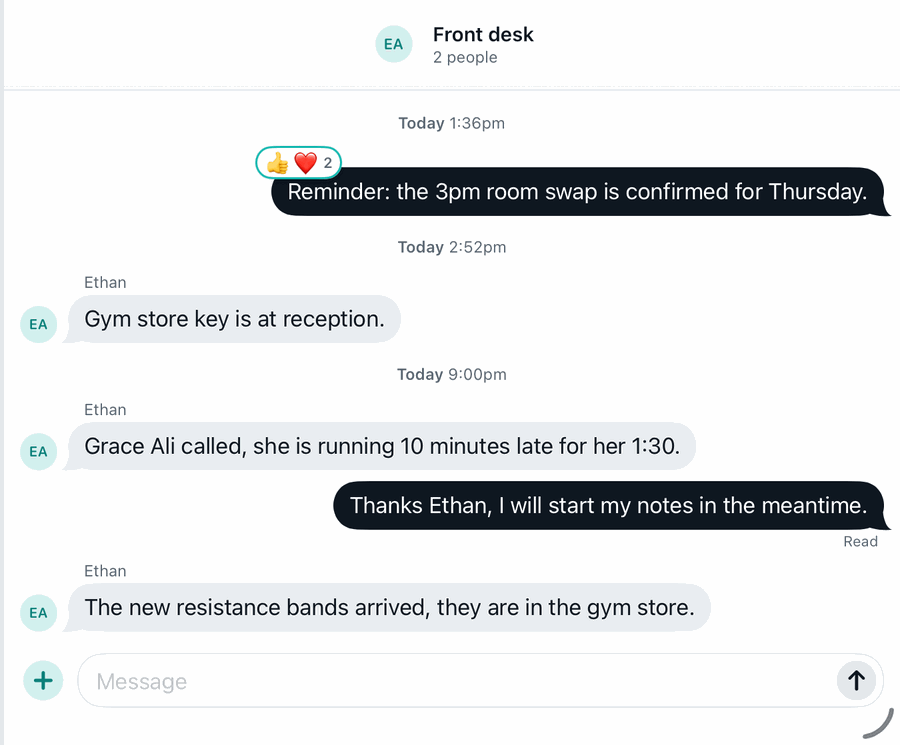
Messages are staff to staff only. Patients never see them, and nothing a patient writes ends up here.
Private to the people in the conversation
Only the people in a conversation can read it, and that includes owners and managers. A group the owner is not in stays between its members. Messages are stored encrypted and never pass through an outside service, and the audit log records that a conversation exists and who was added, never what was said. See patient privacy and security for how the rest of the record is protected.
Notices everyone sees
The team feed is the practice's own noticeboard. Post news, a photo of the new treatment room or a thank-you, and colleagues react and reply. Joinings, work anniversaries and milestones are posted by themselves.
When something must be read, such as a change to opening hours or a new cleaning routine, a manager marks the post Important. It waits on every person's Dashboard until they press Got it, so nobody can say they missed it.
Tasks instead of notes on the desk
"Ring this patient back" or "chase this claim" becomes a task, with who it is for and when it is due. Open tasks show on the Dashboard, for the person they belong to or for anyone at the desk, and they stay there until someone finishes them.
Hours and leave, in the same place
Each person clocks on and off and asks for leave from My time, and approved leave shows in the diary so nobody is booked with a practitioner who is away. Managers sign off each pay period's hours. See timesheets and leave.
For more than one site
Staff at every site use the same messages, feed and tasks, so a question from one clinic reaches the right person at another. See multi-site practices.
Frequently asked questions
Can an owner read the team's private messages?
No. Only the people in a conversation can read it, owners included.
Can patients see team messages?
No. Team messages are between staff only.
Does it work on a phone?
Yes. Messages, the feed and tasks open in the browser on any phone, tablet or computer.
Does team messaging cost extra?
No. It is part of Clinidiary for every practice.